See your whole
net worth in one place.
Auralia brings every asset, investment and account together — then shows you how your wealth is growing today and where it's headed tomorrow. Beautifully private, always yours.
"What gets measured gets multiplied."— A quiet truth of money
Everything you own, finally in focus
Stop guessing across spreadsheets and bank apps. Auralia gives you one calm, complete picture.
Track every asset
Cash, stocks, crypto, real estate, retirement, business — organised and colour-coded in one ledger.
See real gains
Compare what you invested to what it's worth now and watch your true return at a glance.
Project your future
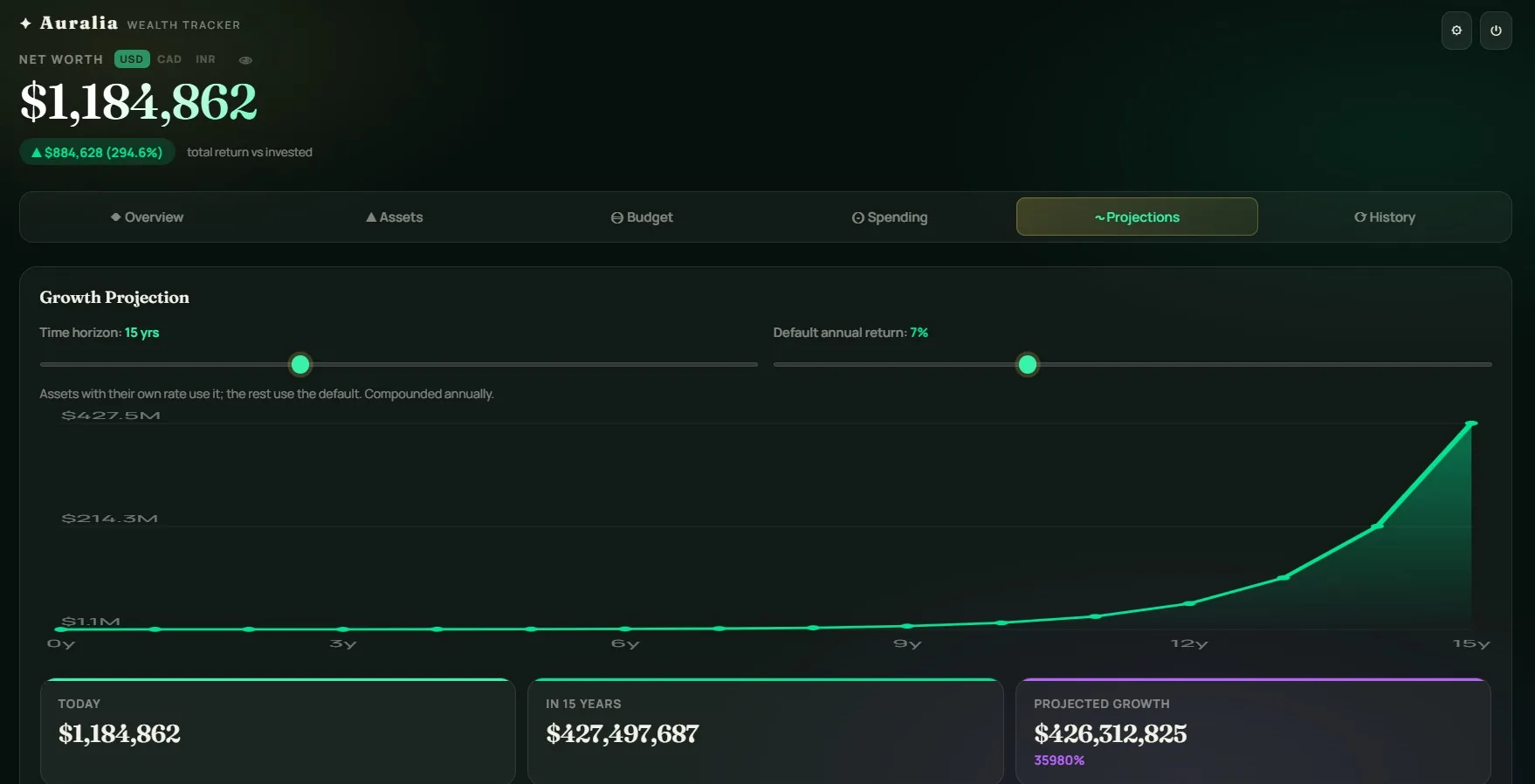
Set a growth rate and time horizon to see how your wealth compounds over the years ahead.
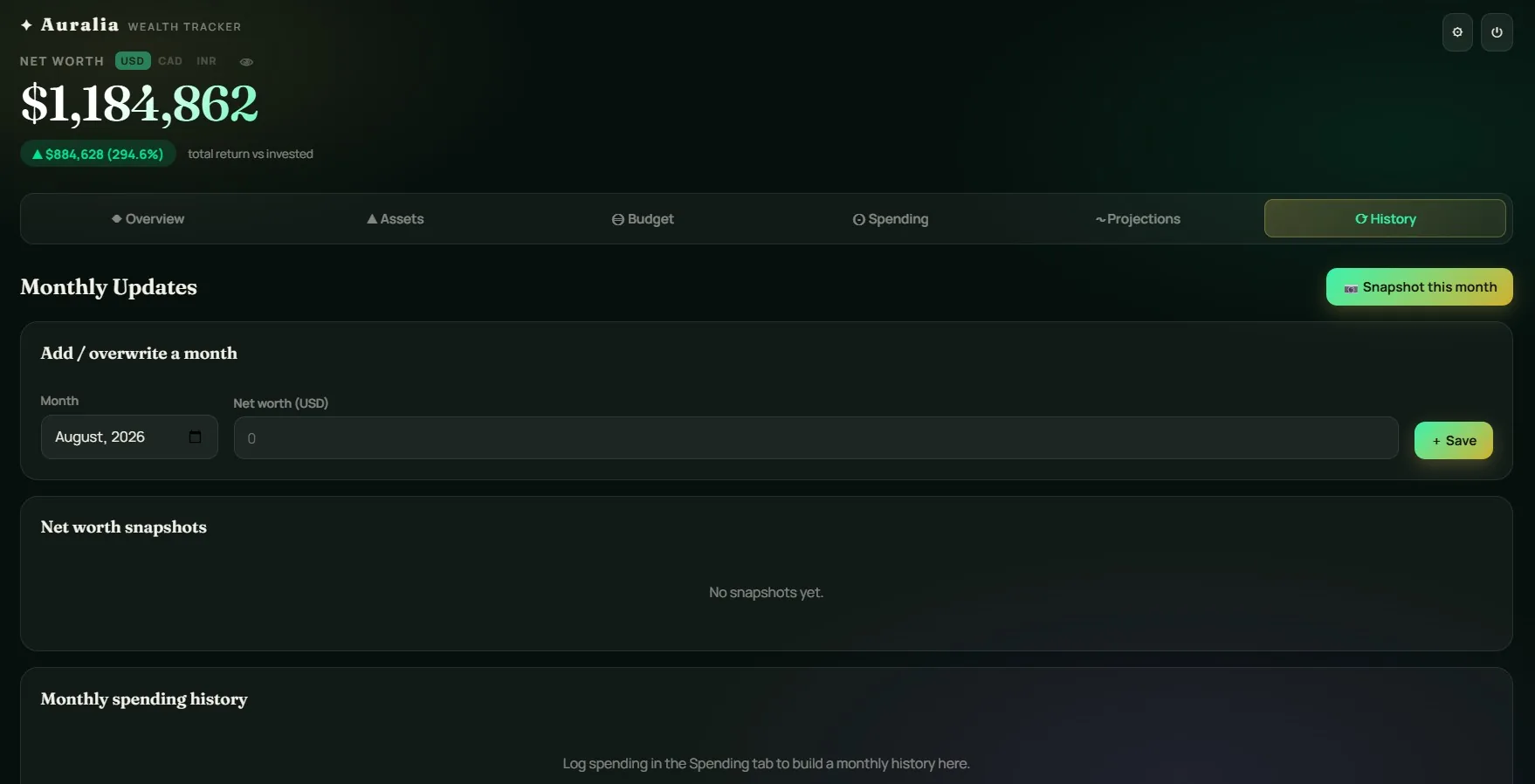
Monthly updates
Capture a snapshot each month and watch your net-worth trend climb over time.
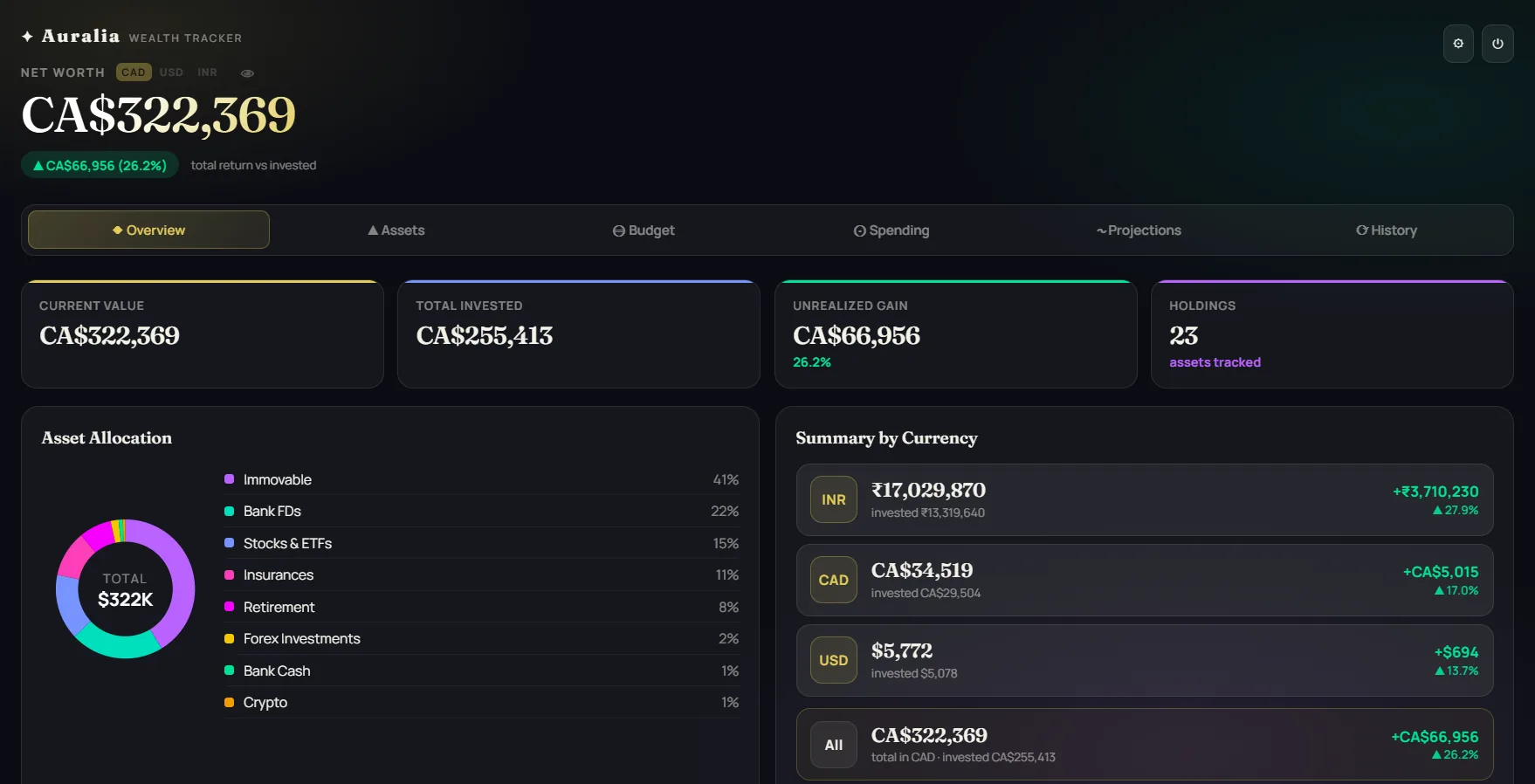
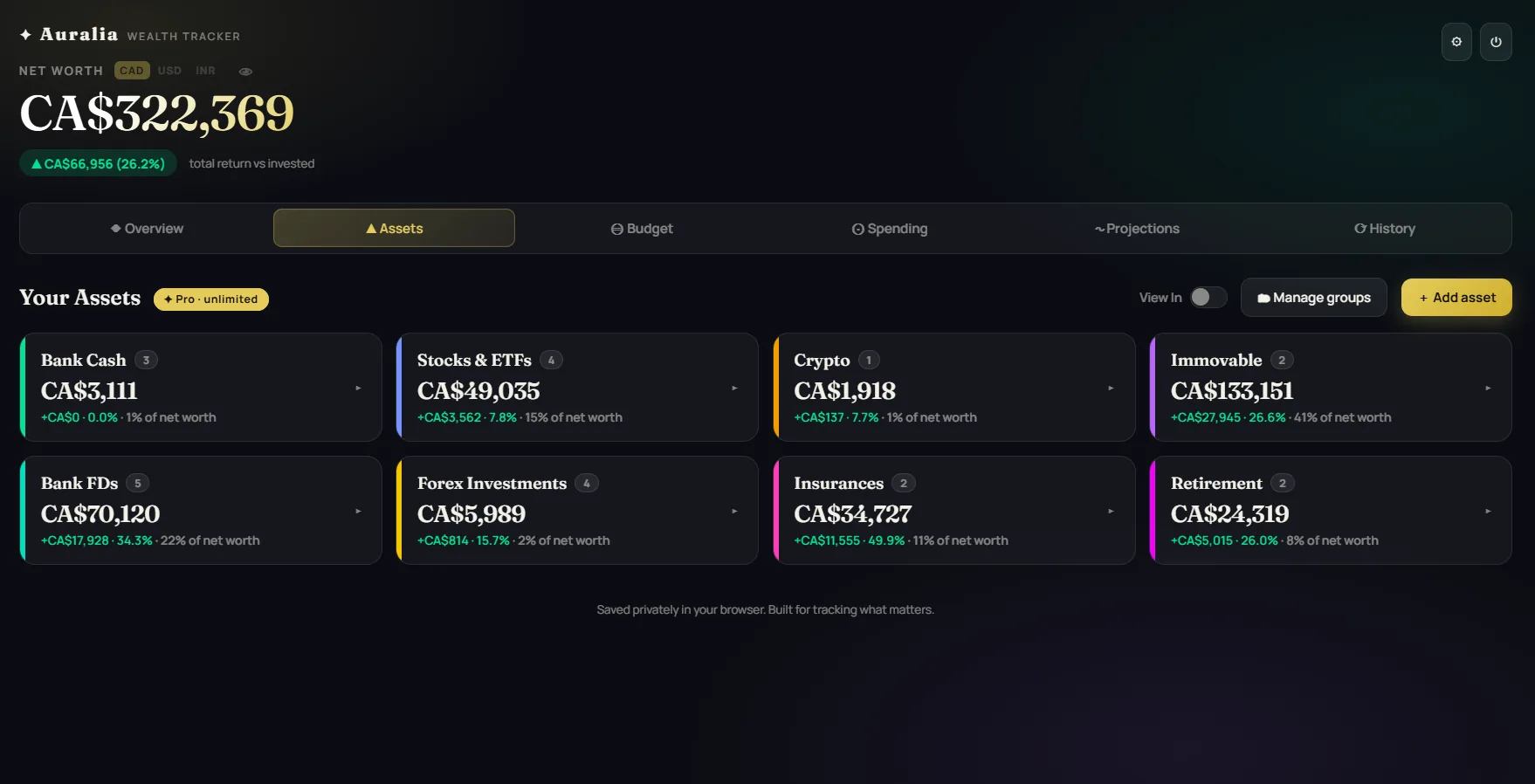
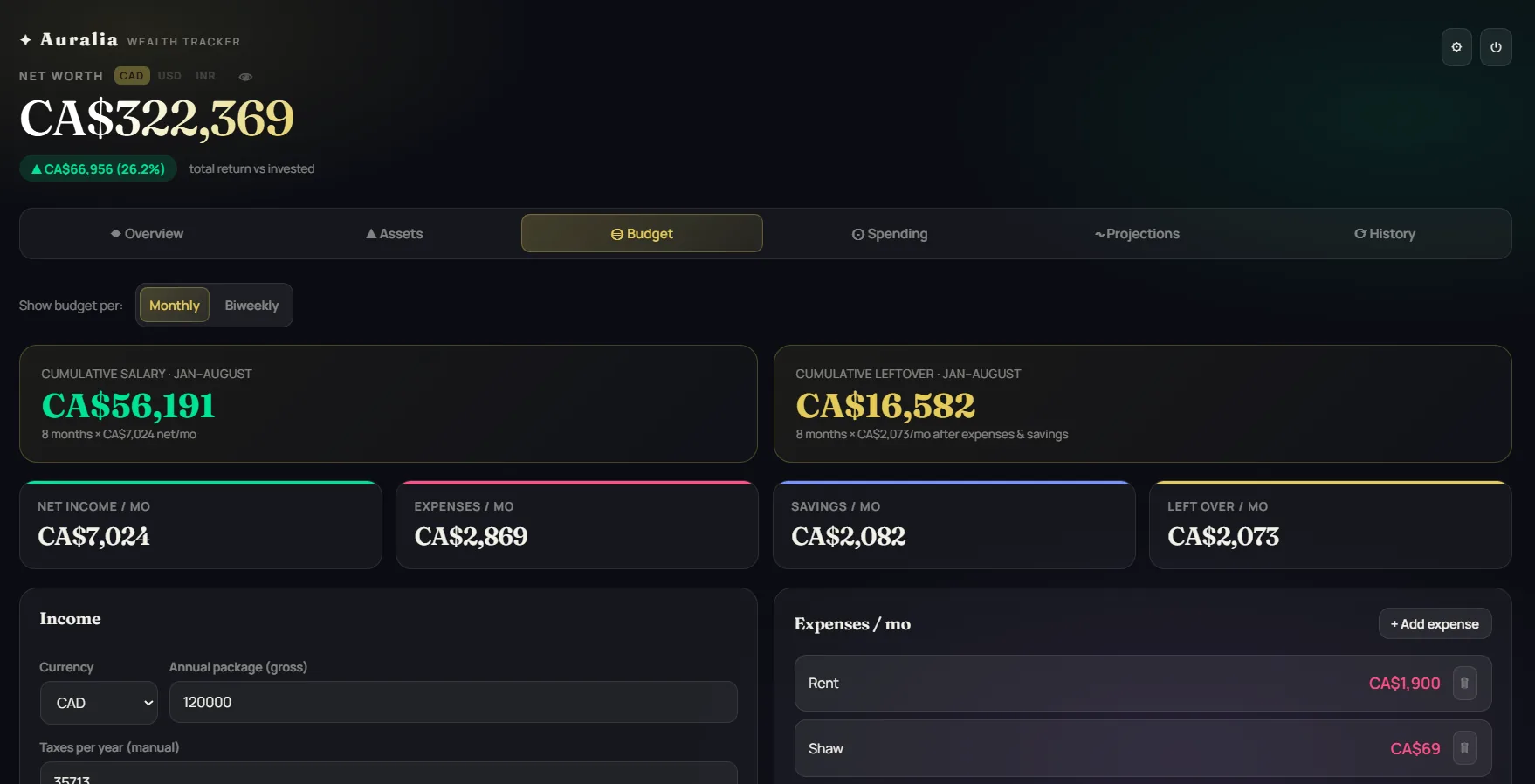
See your whole financial life, beautifully
Swipe through the dashboard — track every asset, plan your budget, and project where you're headed.
A free net worth tracker that respects your privacy
Auralia is a simple, private net worth and investment tracker you can start using in under a minute — no bank account linking and no signup forms selling your data.
Add your assets
Cash, stocks, crypto, real estate, retirement — enter whatever you hold, in any currency.
See your total, instantly
Every asset converts into one live net-worth figure, with gains and allocation broken out automatically.
Organize your way
Group holdings however makes sense to you — create, rename, or split groups any time.
Watch it compound
Set a growth rate and time horizon to see where your wealth is realistically headed.
Most personal finance apps ask you to connect your real bank and brokerage logins. Auralia takes the opposite approach: you add your assets yourself, and everything is stored privately in your own browser. That makes it a genuinely private wealth dashboard for anyone who wants to see their complete financial picture without handing their credentials to a third party.
Add any kind of asset — bank savings and term deposits, stocks and ETFs, crypto, real estate, retirement accounts, forex positions, insurance policies and more — and organise them into your own custom groups. For stocks and ETFs you can enter your shares and buy price and pull live US market prices, while everything else can grow automatically using an expected monthly or yearly rate. Hold assets in different currencies and Auralia converts them all into one display currency so your total net worth is always accurate.
Beyond a running net worth total, Auralia shows your real gains versus what you invested, an asset-allocation breakdown, future-value projections that compound your portfolio over time, and monthly snapshots so you can watch your wealth trend grow month after month. It's the kind of clear, all-in-one view people usually build by hand in a spreadsheet — without the spreadsheet.
Common questions
Is Auralia really free?
Yes. The free plan lets you track up to five assets with full gain tracking, projections and monthly snapshots. Upgrade only if you want unlimited assets.
Do I have to link my bank?
No. Auralia never connects to your bank or brokerage. You enter your assets manually, which keeps your login details completely out of it.
Where is my data stored?
Privately, in your own browser on your own device. It isn't uploaded to a server, sold, or shared with anyone.
Can it track stocks and crypto?
Yes — stocks, ETFs, crypto, real estate, FDs, forex, insurance and anything else, across multiple currencies, all converted into one total.
Does it work on mobile?
Yes. Auralia runs in any modern browser on phone, tablet or desktop.
Can I see future projections?
Yes. Set an expected growth rate and Auralia projects how your net worth compounds over the years ahead.
Can I track net worth in multiple currencies?
Yes. Hold assets in CAD, USD, INR and more — each keeps its native currency, and Auralia converts everything into one display total with a per-currency breakdown.
Is there a net worth tracker that doesn't link to my bank?
That's exactly what Auralia is. Unlike Mint or Empower, it never connects to your bank or brokerage — you add assets manually, so your credentials are never involved.
Does Auralia work offline / privately?
Your financial data lives only in your browser, so once loaded it keeps working without sending your numbers anywhere. Live stock prices are the only optional online feature.
Can I budget and track spending too?
Yes. Alongside net worth, Auralia has a Budget tab (income, expenses, savings, leftover) and a Spending tab that logs monthly expenses you can compare month to month.
Is there a free trial for Pro?
Yes. Pro comes with a 14-day free trial. Cancel anytime before the trial ends and you won't be charged.
What if I don't like it after upgrading?
Every paid plan — Pro or Lifetime — is covered by a 30-day money-back guarantee. Email us within 30 days of purchase for a full refund, no questions asked.
Start free. Stay in control.
Begin with everything you need at no cost. Upgrade only if you want it — every paid plan comes with a 14-day free trial and a 30-day money-back guarantee.
Free
- ✓ Track up to 5 assets
- ✓ Gain / loss tracking
- ✓ Growth projections
- ✓ Monthly snapshots & trends
- ✓ 100% private — data stays with you
Pro
- ✓ Unlimited assets
- ✓ Everything in Free
- ✓ Live US stock & ETF prices
- ✓ All future Pro features
- ✓ Cancel anytime
Lifetime
- ✓ Unlimited assets
- ✓ Everything in Pro
- ✓ One-time payment, no subscription
- ✓ All future updates
- ✓ Priority support
All paid plans are covered by a 14-day free trial (Pro) and a 30-day money-back guarantee (Pro & Lifetime). See our refund policy →
Take your ledger anywhere
Auralia keeps your data private in one browser — but you're never locked in. Export a backup, carry it with you, and pick up exactly where you left off on any PC.
1. Export on Device A
Open Settings → Export backup. Auralia saves your whole ledger — assets, budget, currencies — into one small file.
2. Carry the file
Email it to yourself, drop it on a USB drive, or save it to any cloud folder — the file goes wherever you go.
3. Import on Device B
Open Settings → Import backup, pick the file, and every number is right there — nothing lost, nothing re-typed.
Nothing is ever uploaded automatically — moving your data between devices is always something you choose to do, on your terms.
Never lose a number
Your data lives in one browser, so a lost laptop or a cleared cache means it's gone for good — unless you've backed up. Auralia makes that a two-click habit.
1. Watch for the reminder
If it's been 30+ days since your last backup, Auralia shows a gentle banner right on your dashboard — easy to act on, easy to dismiss if you're not ready.
2. One click downloads & drafts an email
Settings → Email me a backup reminder downloads your data and opens an email to yourself, ready to go.
3. Attach, send, done
Attach the file you just downloaded and hit send — now a dated copy of your whole ledger sits safely in your own inbox, searchable forever.
No server ever touches this file — it downloads straight to your device, and the email is yours to send or skip.
Set up your currencies in minutes
Whether your money lives in one country or five, Auralia handles the conversion — you just tell it what to track.
1. Pick your main currency
Settings → Display currency. This is what your Net Worth is always shown in, no matter what currency each asset is actually held in.
2. Add the currencies you use
Settings → Manage currencies. Toggle on any of ~85 world currencies — only the ones your accounts actually use show up as options elsewhere.
3. Keep rates fresh
Settings → Exchange rates → Fetch live rates pulls current conversions anytime, or edit any rate by hand if you'd rather.
Rates are approximate market values — always edit-anytime, never locked to a single source.
Your clearest view of money starts now.
Join in under a minute. No card, no clutter — just a calm, complete picture of your wealth.
Join free →Need something changed or added?
Got a feature request, a setting you wish existed, or something that just doesn't feel right? Tell us — we read every message.
Sent straight to our inbox — no email app needed on your end.